Saturday, September 15, 2012

Secure JAX-WS with Apache CXF (Some links)

Some useful links for my reference, related to securing JAX-WS services when using Apache CXF:


Some background:

If you want to create a JAX-WS web service as standalone Java program (i.e., one that starts with a main(String..) method), there are two approaches:


1. If you can deploy your application on the Sun JVM, you can probably easily use Sun's HTTP server that comes bundled with it.
Something on the lines of:
KeyStore keyStore = KeyStore.getInstance("JKS");
keyStore.load..
KeyManagerFactory keyManagerFactory = KeyManagerFactory.getInstance..
keyManagerFactory.init..
SSLContext sslContext = SSLContext.getInstance("TLS");
sslContext.init..
HttpsServer httpsServer = HttpsServer.create..
httpsServer.setHttpsConfigurator.. (pass the sslContext here)
HttpContext httpContext = httpsServer.createContext..
httpContext.setAuthenticator.. (for example, a BasicAuthenticator)
httpsServer.start();
Endpoint e = Endpoint.create(impl)
and e.publish(httpContext)


2. Instead, if you want you application to be portable and be able to run on any JVM, one way is to use an alternate JAX-WS implementation, such as Apache CXF.
Doing this would mean the following:
- Download the CXF distribution and add a large number of JARs that it needs to the classpath.
- If SSL and authentication is not needed, a simple one-liner is all that's needed:
http://cxf.apache.org/docs/a-simple-jax-ws-service.html#AsimpleJAX-WSservice-Publishingyourservice

- If SSL is needed, refer to the wsdl_first_https sample in the CXF distrbution, and set up a Spring configuration file to enable SSL on the embedded Jetty that CXF internally uses:
http://svn.apache.org/repos/asf/cxf/trunk/distribution/src/main/release/samples/wsdl_first_https
http://svn.apache.org/repos/asf/cxf/trunk/distribution/src/main/release/samples/wsdl_first_https/src/main/resources/ServerConfig.xml
And make your Java program use that Spring configuration:
http://svn.apache.org/repos/asf/cxf/trunk/distribution/src/main/release/samples/wsdl_first_https/src/main/java/demo/hw_https/server/Server.java

-If basic authentication is desired, add a Jetty handler to that Spring configuration file,
 <httpj:handlers>
        <beans:bean class="org.example.MyLoginHandler">
 </beans:bean></httpj:handlers>
where the handler MyLoginHandler extends ConstraintSecurityHandler, and in its constructor, initializes itself.
Some links on initializing a SecurityHandler:
http://wiki.eclipse.org/RAP/FAQ#How_can_I_use_Jetty_basic_authentication_in_my_application.3F
http://stackoverflow.com/questions/8056851/basic-authentication-with-embedded-jetty-7-server-and-no-web-xml-file

Miscellaneous references:
http://cxf.apache.org/docs/jetty-configuration.html
http://stackoverflow.com/questions/12423862/using-j2se-endpoint-with-embedded-tomcat

Monday, September 3, 2012

Five months of Linux

Back in April earlier this year, I made a decision to switch over from Windows to Linux. And now it's September - probably a good time to write about it.

It was my work Laptop that I decided to migrate to Linux. I use it all day at office for my regular job, and in that sense, it was probably a pretty risky decision.

Nevertheless, IBM, where I work, has good IT support for employees wanting to switch over to Linux. I got a custom Linux distro DVD from them (based on Red Hat), with a good lot of IBM software pre-installed. The installation went pretty smoothly, and I was up and running in a few hours.  


Do I miss Windows? Sometimes yes.

But only occasionally.

1. Look and feel

The Windows look and feel is certainly addictive - for someone who has used Windows for years together, it's natural to feel a bit uncomfortable in Linux - and I had anticipated this. Five months down the road, I feel quite happy with the Linux (GNOME) look and feel now.

2. Power management

Windows does a few other things better too - and the one that I realized a little late is its good power management capability. There's a little feature that goes by the name of "switchable graphics" that I got into trouble with when I moved over to Linux.

Basically if your motherboard has an in-built graphics controller and you also have a more feature-rich, but power-hungry discrete graphics controller attached, Windows makes a choice for your as to which one of these graphics controllers to use. If you're watching a movie or playing a game, probably you'd need the discrete controller, and for normal use, the in-built one is good enough.

My Linux, however, just kept using the discrete one all the time - draining out power quickly and heating up like a stove within a few hours of use. The fan control wasn't good either and I was very worried about it in the first few days of my Linux use. Thankfully, there was a way out in the BIOS setting of the motherboard that I could use to turn off the discrete controller altogether, and I sailed out of the problem.

3. Support for hardware devices

More generally, Windows seems to have better support for hardware devices.
  - My home printer, a Canon PIXMA, wouldn't work in Linux (there's no driver)
  - My phone, a Nokia, can't be connected to Linux (there's no PC suite for Linux)

With Linux, I always need to be ready for trouble every time I attach any hardware - be it a modem, or an internet data card, a camera or whatever. But for me, hardware support is not a very big deal. This is my work PC - I don't "need" to attach any phone, camera or portable printer to it per-se, I just "want" to, at times, and I can adjust to not being able to do so.

And why won't I switch back to Windows?

Well, to be honest, inertia is certainly one of the factors - I don't want to do all the backup/install/restore/get-accustomed-to business all over again. But that's neither the only factor nor the strongest one.

The way I instinctively feel that Windows looks good, and the way I feel that it works with any hardware I might plug in, I "feel" certain things about Linux too. I feel that my Linux is rock solid - I feel that it won't crash. I feel that Linux gives me the power to make my computer work for me.

Windows makes me feel that my computer is a friend of mine. Linux makes me feel that I'm the boss commanding my computer to do what I want.


Now to the details:

  •  I have SELinux enabled.I have full disk encryption LUKS, as well as an Antivirus suite.

  • I really adore ssh, scp, sftp, gzip, split and other wonderful utilities now. They are far better, faster, and natively integrated here in Linux than PuTTY and other clones that I had to use back there in Windows.

  • Software installation and upgrades are a breeze. I found almost anything I needed in the GNOME package manager - from Octave (for data analysis) to Calibre (e-book reader), KColorPaint (much better than the Windows Paint) and many more.

  • When building from source, it's almost impossible in Windows - I'd need to struggle with Cygwin and stuff like that. It's a trivial affair now in Linux.

  • And I've really got used to the little widgets on my desktop panels - GNote, the GNOME Calc, the system monitor and so on.

  • IBM software too work well and feel pretty robust in Linux (I have many of them installed to do my job - Rational Software Architect, WebSphere App Server, DB2, Lotus Symphony, Notes, Sametime, and others).

  • I never need to worry about stuff like disk de-fragmentation, long file names, or accidentally deleting something in C:\Windows - (only on a handful of times have I had to switch over to root). Backups are easy too. I just tell Deja Dup to backup up my home folder and I can be sure there's nothing else scattered around all over the place.

And to conclude, at least for now..

Do I like Linux? Well, not the way I'd adore a beautiful sky with a bright sun and a rainbow on the other side. But I do like Linux the way I'd like the cockpit of a supersonic aircraft at thousand miles above the ground, with me inside.

Friday, January 27, 2012

Compiling Meep

Meep is a fantastic electromagnetic field simulator from MIT. [Link:ab-initio.mit.edu]

It runs fine on my Windows XP laptop, but my laptop isn't all that powerful to perform any meaningful simulations reliably. Fortunately I got access to a bigger 64-bit Linux machine that's got 128GB of RAM :) Installing Meep on it was a bit of a pain, though.. as I didn't have administrative access to that system, and finding the right versions of dependencies and compiling them with the right options was tricky.

Here's what finally worked for me:


mkdir --parents /home/kpachar1/meep/local

wget ftp://ftp.gnu.org/gnu/libtool/libtool-1.5.6.tar.gz
gunzip libtool-1.5.6.tar.gz
tar -xf libtool-1.5.6.tar
cd libtool-1.5.6
./configure --prefix=/home/kpachar1/meep/local
make clean
make
make install
cd ..

wget ftp://ftp.gmplib.org/pub/gmp-5.0.3/gmp-5.0.3.tar.bz2
bunzip2 gmp-5.0.3.tar.bz2
tar -xf gmp-5.0.3.tar
cd gmp-5.0.3
export LDFLAGS=-L/home/kpachar1/meep/local/lib
export CPPFLAGS=-I/home/kpachar1/meep/local/include
./configure --prefix=/home/kpachar1/meep/local
make clean
make
make install
cd ..

export LD_LIBRARY_PATH=/home/kpachar1/meep/local/lib

wget ftp://ftp.gnu.org/gnu/guile/guile-1.8.8.tar.gz
gunzip guile-1.8.8.tar.gz
tar -xf guile-1.8.8.tar
cd guile*
export LDFLAGS=-L/home/kpachar1/meep/local/lib
export CPPFLAGS=-I/home/kpachar1/meep/local/include
./configure --prefix=/home/kpachar1/meep/local --with-local-prefix=/home/kpachar1/meep/local
make clean
make
make install
cd ..

export PATH=$PATH:/home/kpachar1/meep/local/bin

wget http://ab-initio.mit.edu/libctl/libctl-3.1.tar.gz
gunzip libctl-3.1.tar.gz
tar -xf libctl-3.1.tar
cd libctl-3.1
export CPPFLAGS=-I/home/kpachar1/meep/local/include
export LDFLAGS=-L/home/kpachar1/meep/local/lib
./configure --prefix=/home/kpachar1/meep/local
make clean
make
make install
cd ..


wget http://www.open-mpi.org/software/ompi/v1.4/downloads/openmpi-1.4.4.tar.bz2
bunzip2 openmpi-1.4.4.tar.bz2
tar -xf openmpi-1.4.4.tar
cd openm*
./configure --prefix=/home/kpachar1/meep/local
make
make install
cd ..


wget http://www.hdfgroup.org/ftp/HDF5/releases/hdf5-1.6/hdf5-1.6.10/src/hdf5-1.6.10.tar.gz
cd hdf5-1.6.10
./configure --prefix=/home/kpachar1/meep/local
make clean
make
make install
cd ..


wget http://ab-initio.mit.edu/h5utils/h5utils-1.12.1.tar.gz
gunzip h5utils-1.12.1.tar.gz
tar -xf h5utils-1.12.1.tar
cd h5utils-1.12.1
export LDFLAGS=-L/home/kpachar1/meep/local/lib
export CPPFLAGS=-I/home/kpachar1/meep/local/include
./configure --prefix=/home/kpachar1/meep/local
make clean
make
make install
cd ..


wget http://ab-initio.mit.edu/meep/meep-1.1.1.tar.gz
gunzip meep-1.1.1.tar.gz
tar -xf meep-1.1.1.tar
cd meep-1.1.1
./configure --prefix=/home/kpachar1/meep/local --with-libctl=/home/kpachar1/meep/local/share/libctl --with-mpi
make clean
make
make install
meep-mpi
cd ..

Tuesday, July 13, 2010

Eclipse RCP product export and ${target.os}

It's a fine day today. My small little Eclipse-RCP app is looking all fine and healthy.

I open my plugin.xml and click on the round, green "Launch an Eclipse application" icon and it works great.
Sometimes I use Run->Run History->and pick the latest one, and again, it works flawlessly.

Cool. Now let's package it up in an EXE.

Here's the problem.

You'd think it's just a matter of creating a product configuration file, right? Just right click on the plugin project, choose New->Product Configuration. Then select "Use a launch configuration" and point it to our trusted, tested, working launch configuration.

Do it, and it won't work. I tried it with Eclipse 3.5 (Galileo) as well as Helios, and it just doesn't work.

You application refuses to start. You look at the logs in the "configuration/" folder and you see cryptic stuff like this:

org.osgi.framework.BundleException: The activator org.eclipse.ui.internal.WorkbenchPlugin for bundle org.eclipse.ui.workbench is invalid


java.lang.NoClassDefFoundError: org.eclipse.swt.SWTError


Well, the SWT jars are there. The Windows-specific ones are there too. I *have* done a Synchronize before export, I did choose to include all dependencies, including the optional ones.

The problem, as it happens to be, is a tiny little thing called the "Program Arguments".
This is what you get by default from the new Product Configuration wizard:


And this says that the product is to be launched on an OS named "${target.os}". I have heard of Windows XP, Linux, AIX, Solaris, but never something claled ${target.os}.

Of course, the launch configuration has the same string and it works fine.. but it gets replaced by the actual value of the OS when it runs. But the poor product configuration doesn't know that and treats it verbatim.

I'm running on Windows XP, not ${target.os}. So it doesn't recognize the target platform. It doesn't recognize the platform-specific SWT JARs, and it fails.

I tired for a minute or so to figure out what the right values for these variables were for Windows XP / J2SE 5.0, but I couldn't get them. Deleting them (blanking out the Program Arguments box completely) worked for me, though. So I won't care about it until I come across a problem with it again.

Sunday, July 11, 2010

What's wrong with the JSF 2 ui:repeat

The single little thing that's been able to hold my attention repeatedly over the past few weeks in JSF 2 has been the "ui:repeat" tag.

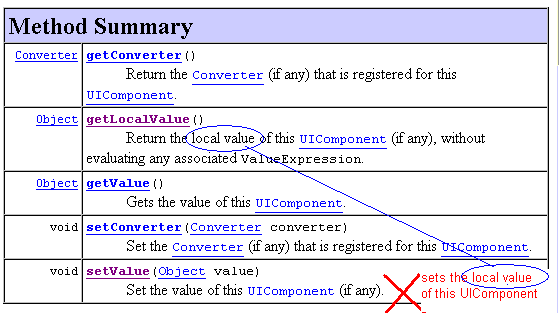
To begin with, it's quite simple. It's so very simple that it's authors probably find it too trivial to explain what it does. This is all you get in its tag library documentation:


Ok. So it's an alternative to c:forEach, or h:dataTable, right? Maybe they just created this tag for some political reasons(if there're two more tags in the same spec and the same impl for the same purpose, you do get the doubt), but that's fine with me as long as it works.

"As long as it works".. hmm... yes.. and that's the tricky part. It seems to be that there are a number of issues with ui:repeat. Most importantly, when you have nested ui:repeats, things start behaving real crazy.

OK. So what if it has bugs? It's an alternative to c:forEach and h:dataTable, right? Let's use c:forEach instead.

And so, when you start using c:forEach, you realize that it's a totally different tag, with a totally different purpose.

Ok. So ditch that c:forEach. Let's see what the bugs with ui:repeat and apply patches ourself.

The first thing - ui:repeat doesn't recognize model updates.
The fix is quite simple. In the process method of UIRepeat, just add a simple check (as suggested by the proposed patch on the bug report):

if (PhaseId.RENDER_RESPONSE.equals(phase) && !hasErrorMessages(faces)) {
if(isNestedInIterator()){
this.childState = null;
}
}


And the second thing - ui:repeat botches up input fields - checkboxes, textboxes and all sorts of EditableValueHolders in general. That has also been reported.
The fix is pretty simple, though if you are like me, new to JSF, and stuck with it, with no other way out, you'd need to hit your head against the code for anywhere between three to five days before you figure it out.

In the populate method of the SavedState inner class, just change this one line:
this.value = evh.getValue();
to
this.value = evh.getLocalValue();


The root cause of this second bug is an API design flaw -
The JSF ValueHolder interface has two methods getValue and setValue, but interestingly, they are not complementary. That is, if you use the setValue method and push in some value, you may not get that same value out of the getValue.
Why? Because that's how it has been designed.

Defies conventions and common-sense expectations? Certainly does. Bad API? Definitely.

The method ought to be named setLocalValue, not setValue.

I wonder how these seemingly simple bugs in code and documentation seem to be around for years in such a high quality, high visibility software library.

Saturday, June 12, 2010

TinyMCE as a JSF 2 composite component

I was looking for a rich text editor that I could use on a jsf page, but quite surprisingly, there seems to be nothing useful.

So I tried creating one of my own by using TinyMCE.

It wasn't actually very tough to do.. here's what kind-of worked:

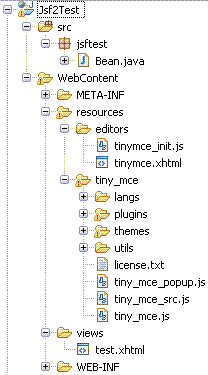
First, I downloaded TinyMCE, and then copied in the tinymce_3_3_7\tinymce\jscripts\tiny_mce folder into my WebContent/resources.

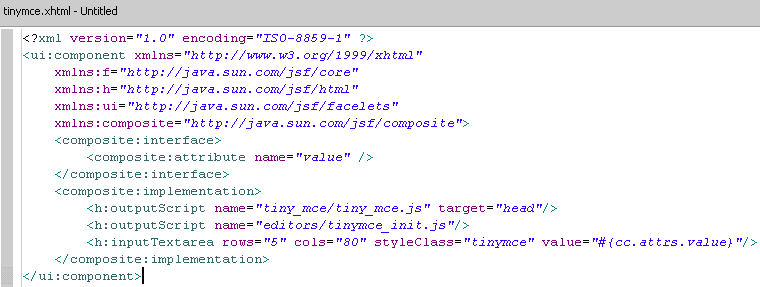
Then I created my composite component facelet file, tinymce.xhtml under the resources/editors folder.

The component itself is quite simple. It just includes the TinyMCE javascript in the head of the document, and outputs a simple text area. Configuration for TinyMCE is done in the tinymce_init.js.


In tinymce_init.js, I have:

tinyMCE.init({
mode : "specific_textareas",
theme : "simple",
debug : true,
editor_selector : "tinymce"
});

Then in my view page, I use it like this:

<h:head />
<h:body>
<h:form id="form">
<h2>Summary:</h2>
<test:tinymce value="#{bean.summary}"/>

<h:panelGrid id="details" layout="block">
<h:commandButton value="Add details..." action="#{bean.showDetails}"
rendered="#{not bean.detailsAdded}">
<f:ajax render="details" />
</h:commandButton>
<h:commandButton value="Remove details" action="#{bean.hideDetails}"
rendered="#{bean.detailsAdded}">
<f:ajax onevent="ajaxAdjust" render="details"/>
</h:commandButton>
<h:panelGrid id="details2" layout="block" rendered="#{bean.detailsAdded}">
<h2>Details:</h2>
<test:tinymce value="#{bean.details}"/>
</h:panelGrid>
<br />
</h:panelGrid>
<h:commandButton value="Save"/>
</h:form>
</h:body>


So that stuff gets saved upon AJAX postbacks, I added this to tinymce_init.js:

ajaxAdjust=function(evt){
if(evt.status=='begin'){
tinyMCE.triggerSave();
}
};


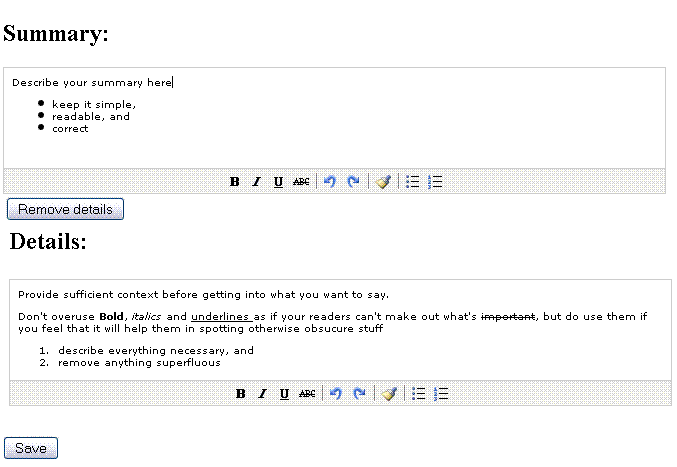
And here's what I have finally, with everything I need:
- As many rich text editors as I want on a page,
- These editors work nicely with JSF 2, VDL and f:ajax
- These are simple editors - they don't have tens of buttons and options that confuse users

Saturday, May 15, 2010

IDs, passwords and emails

I don't know why it happens so often, but it does. You register for a new account on a site, pick a password for yourself and click Submit. Voila! The account is created.

But hey, wait. Did you notice that it just sent you an email with the password in plaintext, just in case you forget it later?

There's nothing more frustrating than realizing in one glance that:
1. Your password is being stored in plaintext on their system.
2. Your password was posted on public insecure internet in plaintext.
3. Your email provider has a copy of that email, with the password in plaintext.